
Do you want to know…
• why you should use Google Classroom?
• what ways to use Google Classroom?
What makes Google Classroom worth using?
What’s all the fuss? Our BYOD environment enables us to approach learning differently. Google Classroom is a handy way to share information to the whole class on the fly, or in a more planned way. It enables you to have a paperless classroom, and can get even the most shy student to share. Watch this video to start thinking of how you might use Google Classroom.
(Rudd)
STEP 1: Content Terms and Definitions
It is important to become familiar with the Google Classroom and SAMR terms and their definitions involved with this lesson. To get you started, look over the list of terms and then refer to them as needed.
Go to: Important Terms to Know
STEP 2: As you think about what could you do with Google Classroom, check out these additional resources:
- Teacher Tech – to to this webpage and scroll down to about the middle where you see the heading, 50 Things You Can Do With Google Classroom.
- 35 More Things You Can Do With Google Classroom – This is a series of 35 videos that are 10-20 seconds long, packed with great ideas.
STOP: Choose one way in which you might use Google Classroom
STEP 3: What is the SAMR Model again???
Remember that we are looking to climb the SAMR ladder. In what ways can Google Classroom be substitution, augmentation, modification or redefinition?
- As needed, review the SAMR model with the video, The SAMR Model and Technology Integration, and think about the kinds of tasks that you assign to your students. Could Google Classroom help you to Augment or Modify a task or tasks using technology that you currently assign without technology?
- Use the flowchart below (or go to THIS LINK) to help you think through the questions to ask as you assess whether an activity on Google Classroom in Substitution, Augmentation, Modification, or Redefinition.
_(Blue Valley)
_ - Finally, think through whether or not using technology, specifically Google Classroom, will actually enhance the learning activity. Use these questions from the creator of the SAMR model to help you evaluate:
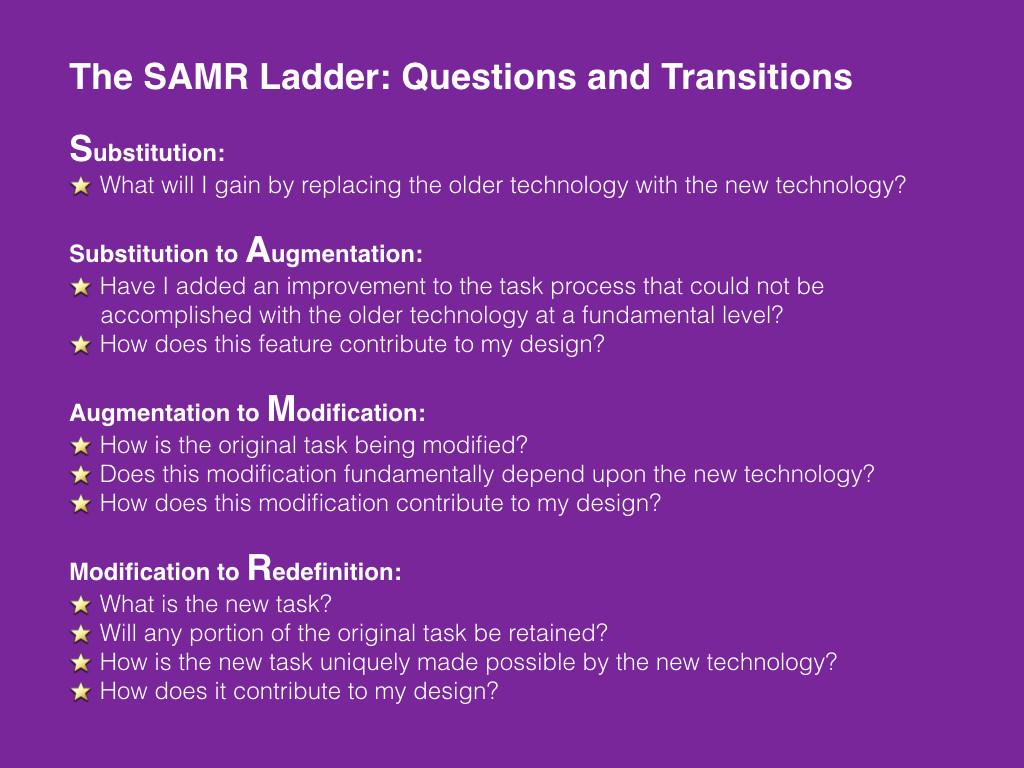
STOP: Think about how technology enhances the learning activity you might do in GC and on which rung of the SAMR model it falls.
STEP 4: Review what you know and/or dig deeper and go a step further.
You will find links for review and links that take you to new learning. Links are annotated to make it easier.

STEP 5: After you review, click on the stop sign below to talk about what you know.
Click here to move on to Activity 2!
REFERENCES
Blue Valley Schools, “SAMR Flowchart,” iTunes U. Web. 27 November 2015.
Puentedura, Ruben, “Thoughts for Design,” slide 4, 3 September 2012, Creative Commons Attribution.
Raymond1922A, File:Go sign.svg, 22 February 2013 via Wikimedia Commons, Modified by Ruth Rudd. Creative Commons License.
Rudd, Ruth, “How Will You Use Google Classroom?” 26 November 2015. YouTube. Web. 27 November 2015.